tl;dr
To fix constant 401 errors when querying the Microsoft Todo Graph API with a personal account, you must set your Entra ID app's Supported Account Type to "Personal accounts only" and use consumers as the tenant ID on the client side.
context
I was building a Microsoft Todo MCP for my Lumon AI Agent so I could ask it to list my todos.
I started out using a Microsoft work account (an E5 developer subscription). Everything worked fine.
Here's what I did:
- Registered a new Microsoft App on the Microsoft Entra ID portal.
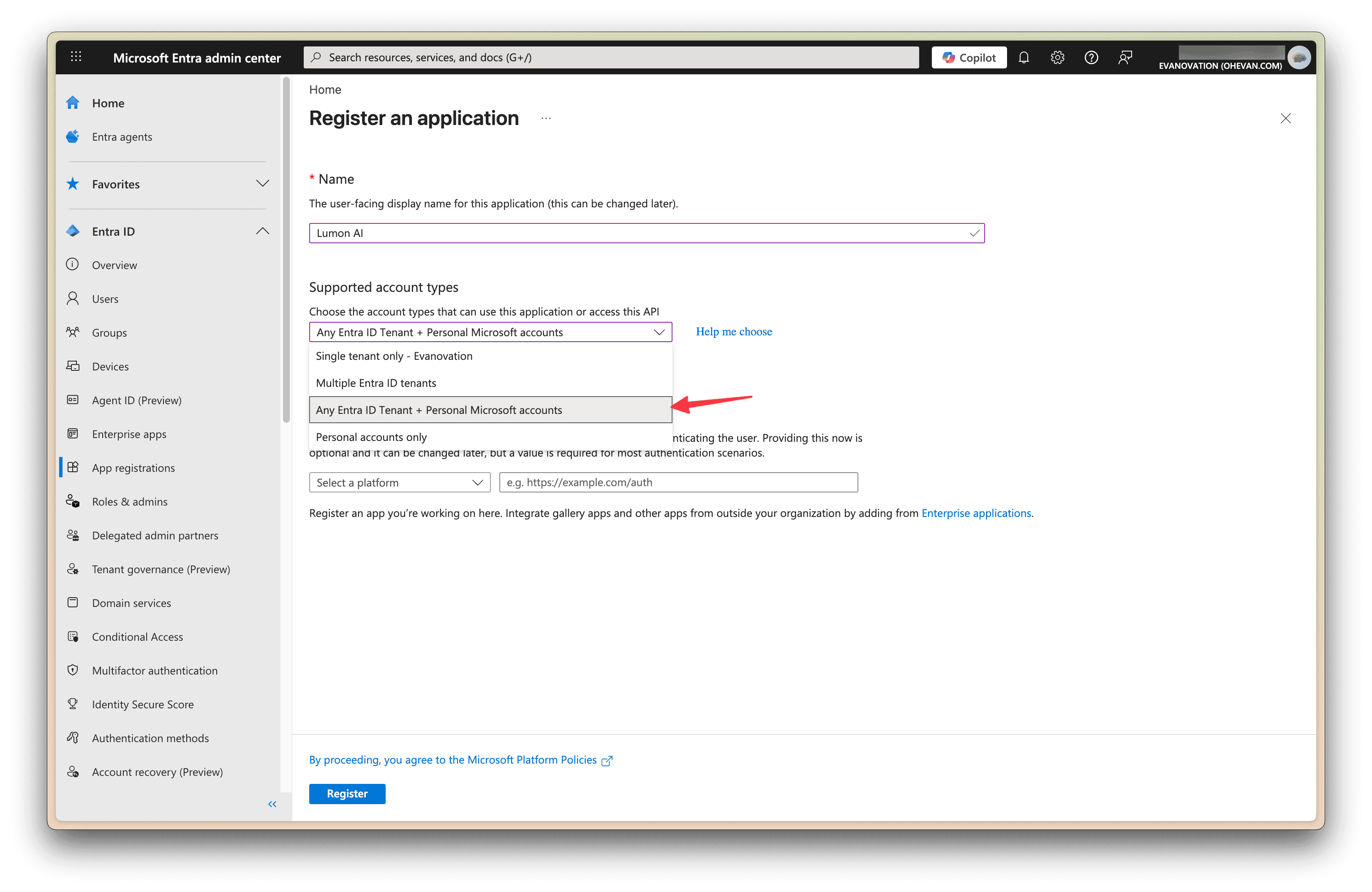
- Chose “Any Entra ID Tenant + Personal Microsoft accounts” for the supported account types.
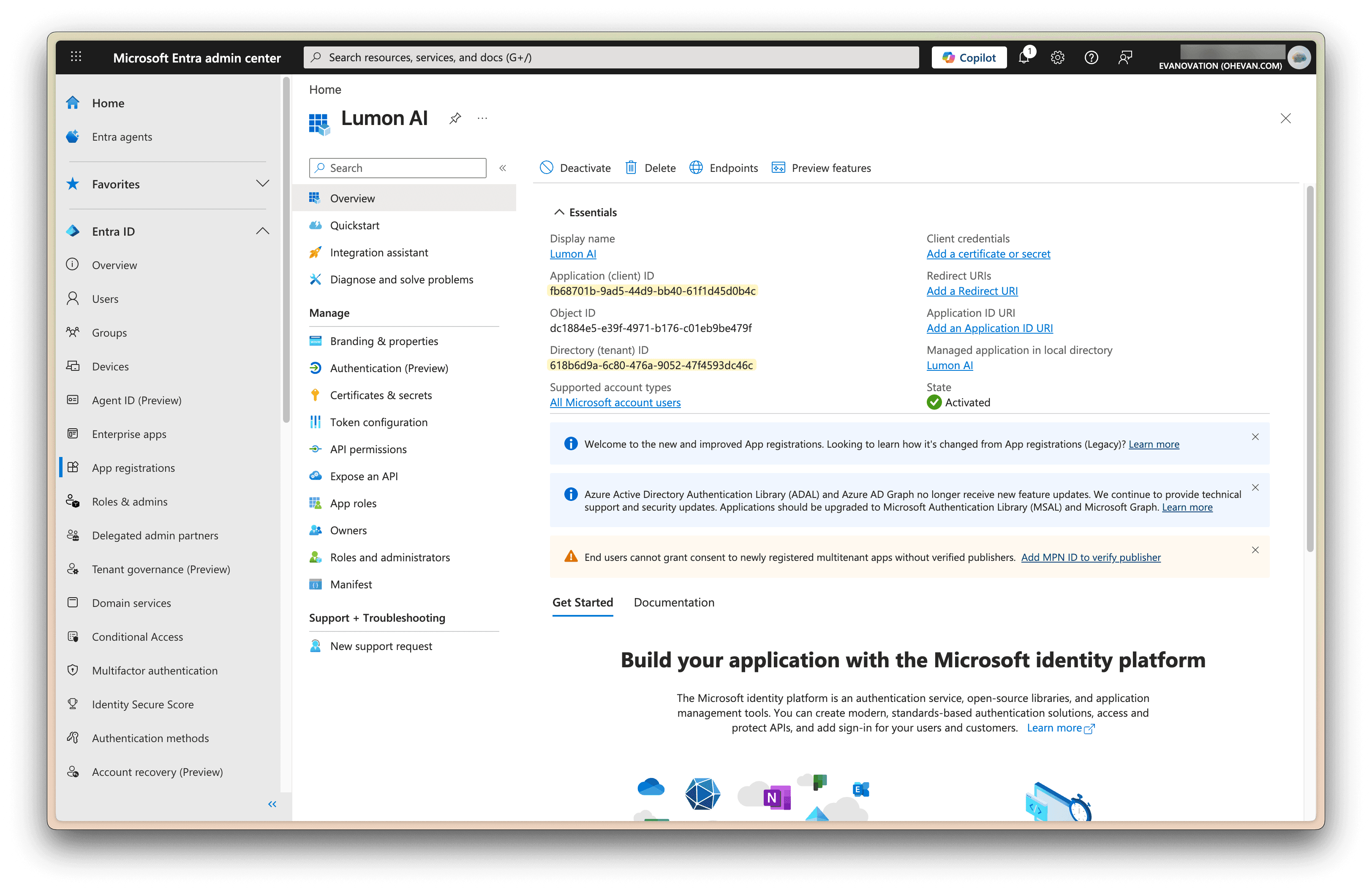
- Got the Client ID, Tenant ID, and Client Secret.
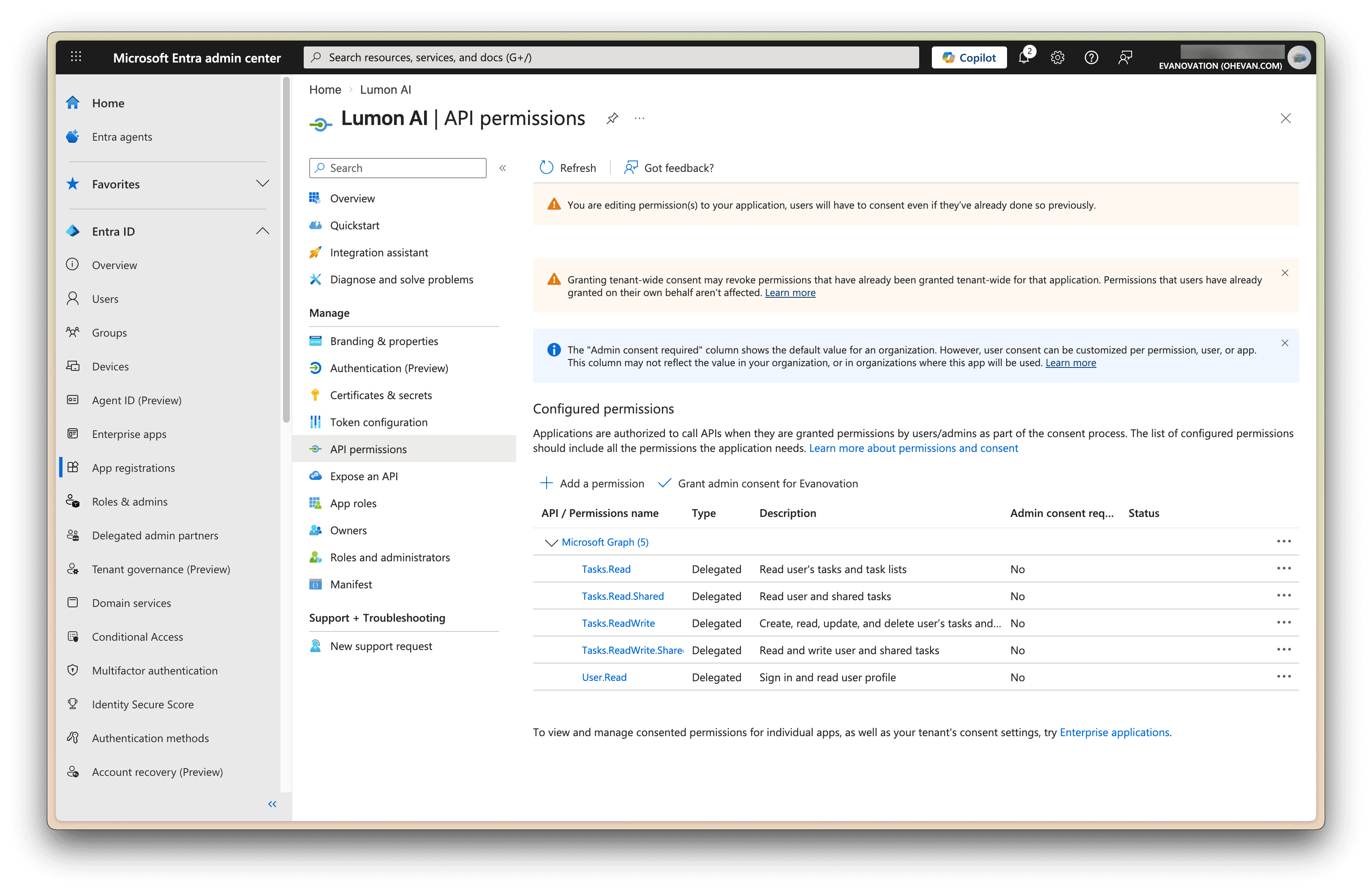
- Assigned API permissions like
Tasks.Read,Tasks.ReadWrite,User.Readetc.
- Authenticated with those credentials, logged in with my work account, and everything worked perfectly.
the problem
But when I tried switching to a personal Microsoft account, I ran into an issue. I followed the exact same steps. I created an App for “Any Entra ID Tenant + Personal Microsoft accounts” and used the tenant ID from the app.
The authentication went through, and I could query the /me endpoint just fine:
curl -i \ -H "Authorization: Bearer $ACCESS_TOKEN" \ -H "Accept: application/json" \ https://graph.microsoft.com/v1.0/mecurl -i \ -H "Authorization: Bearer $ACCESS_TOKEN" \ -H "Accept: application/json" \ https://graph.microsoft.com/v1.0/me
HTTP/2 200 content-type: application/json;odata.metadata=minimal;odata.streaming=true;IEEE754Compatible=false;charset=utf-8 strict-transport-security: max-age=31536000 request-id: 12345678-abcd-1234-abcd-1234567890ab client-request-id: 12345678-abcd-1234-abcd-1234567890ab odata-version: 4.0 date: Sat, 04 Apr 2026 17:55:27 GMT { "@odata.context": "https://graph.microsoft.com/v1.0/$metadata#users/$entity", "userPrincipalName": "user@example.com", "id": "1234567890abcdef", "displayName": "John Doe", "surname": "Doe", "givenName": "John", "preferredLanguage": "en-US", "mail": "user@example.com", "mobilePhone": null, "jobTitle": null, "officeLocation": null, "businessPhones": [] }HTTP/2 200 content-type: application/json;odata.metadata=minimal;odata.streaming=true;IEEE754Compatible=false;charset=utf-8 strict-transport-security: max-age=31536000 request-id: 12345678-abcd-1234-abcd-1234567890ab client-request-id: 12345678-abcd-1234-abcd-1234567890ab odata-version: 4.0 date: Sat, 04 Apr 2026 17:55:27 GMT { "@odata.context": "https://graph.microsoft.com/v1.0/$metadata#users/$entity", "userPrincipalName": "user@example.com", "id": "1234567890abcdef", "displayName": "John Doe", "surname": "Doe", "givenName": "John", "preferredLanguage": "en-US", "mail": "user@example.com", "mobilePhone": null, "jobTitle": null, "officeLocation": null, "businessPhones": [] }
But whenever I tried to query the /me/todo/lists endpoint, I kept getting a 401 error.
curl -i \ -H "Authorization: Bearer $ACCESS_TOKEN" \ -H "Accept: application/json" \ https://graph.microsoft.com/v1.0/me/todo/listscurl -i \ -H "Authorization: Bearer $ACCESS_TOKEN" \ -H "Accept: application/json" \ https://graph.microsoft.com/v1.0/me/todo/lists
HTTP/2 401 content-type: application/json strict-transport-security: max-age=31536000 request-id: 23456789-bcde-2345-bcde-2345678901bc client-request-id: 23456789-bcde-2345-bcde-2345678901bc date: Sat, 04 Apr 2026 17:49:58 GMT { "error": { "code": "UnknownError", "message": "", "innerError": { "date": "2026-04-04T17:49:59", "request-id": "23456789-bcde-2345-bcde-2345678901bc", "client-request-id": "23456789-bcde-2345-bcde-2345678901bc" } } }HTTP/2 401 content-type: application/json strict-transport-security: max-age=31536000 request-id: 23456789-bcde-2345-bcde-2345678901bc client-request-id: 23456789-bcde-2345-bcde-2345678901bc date: Sat, 04 Apr 2026 17:49:58 GMT { "error": { "code": "UnknownError", "message": "", "innerError": { "date": "2026-04-04T17:49:59", "request-id": "23456789-bcde-2345-bcde-2345678901bc", "client-request-id": "23456789-bcde-2345-bcde-2345678901bc" } } }
The same thing happened with all the other Todo endpoints. Just constant 401 Unauthorized errors.
solution
After doing some Googling, I found this Microsoft help article.
It turns out the fix is really simple.
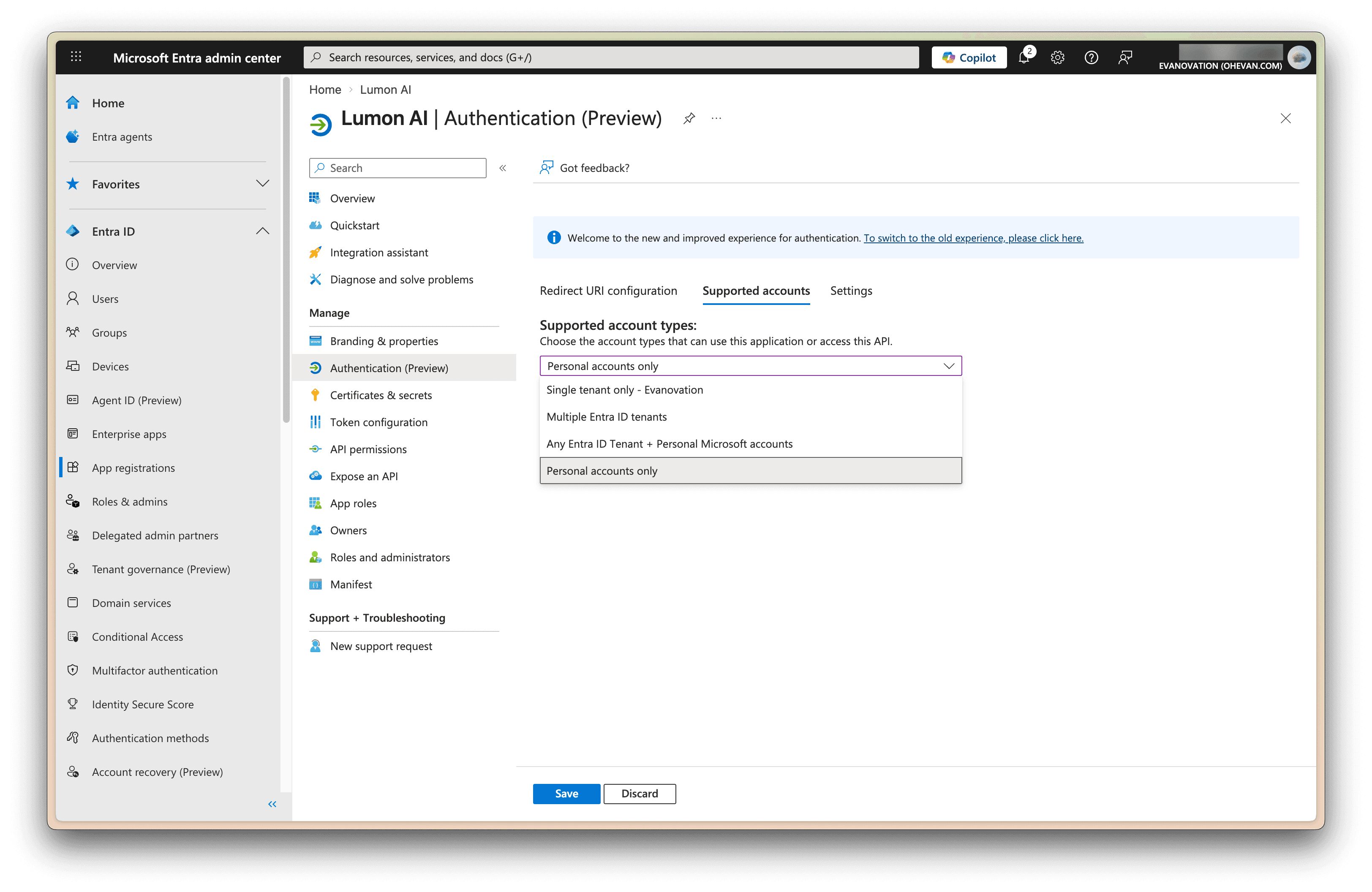
- Set the Supported Account Type to “Personal accounts only”. It turns out you actually CANNOT use “Any Entra ID Tenant + Personal Microsoft accounts” if you want your app to support personal accounts.
- On the client side, set the tenant ID to
consumersinstead of the one you see on the application info page.
Once I made those two changes, everything worked perfectly.
curl -i \ -H "Authorization: Bearer $ACCESS_TOKEN" \ -H "Accept: application/json" \ https://graph.microsoft.com/v1.0/me/todo/listscurl -i \ -H "Authorization: Bearer $ACCESS_TOKEN" \ -H "Accept: application/json" \ https://graph.microsoft.com/v1.0/me/todo/lists
HTTP/2 200 content-type: application/json;odata.metadata=minimal;odata.streaming=true;IEEE754Compatible=false;charset=utf-8 strict-transport-security: max-age=31536000 request-id: 34567890-cdef-3456-cdef-3456789012cd client-request-id: 34567890-cdef-3456-cdef-3456789012cd x-ms-ags-diagnostic: {"ServerInfo":{"DataCenter":"Example Region","Slice":"E","Ring":"3","ScaleUnit":"002","RoleInstance":"EXAMPLE00000001"}} odata-version: 4.0 date: Sat, 04 Apr 2026 17:55:30 GMT { "@odata.context":"https://graph.microsoft.com/v1.0/$metadata#users('name%40example.com')/todo/lists", "value":[ { "@odata.etag":"W/\"FakeEtagValue001==\"", "displayName":"Tasks", "isOwner":true, "isShared":false, "wellknownListName":"defaultList", "id":"AQMkADAwATFAKE0MDAAMS0wZWUAMi0FAKEtTAwAi0wMAoALgAAEXAMPLE0001" }, { "@odata.etag":"W/\"FakeEtagValue002==\"", "displayName":"Project Ideas", "isOwner":true, "isShared":false, "wellknownListName":"none", "id":"AQMkADAwATFAKE0MDAAMS0wZWUAMi0FAKEtTAwAi0wMAoALgAAEXAMPLE0002" }, { "@odata.etag":"W/\"FakeEtagValue003==\"", "displayName":"Flagged Emails", "isOwner":true, "isShared":false, "wellknownListName":"flaggedEmails", "id":"AQMkADAwATFAKE0MDAAMS0wZWUAMi0FAKEtTAwAi0wMAoALgAAEXAMPLE0003" } ] }HTTP/2 200 content-type: application/json;odata.metadata=minimal;odata.streaming=true;IEEE754Compatible=false;charset=utf-8 strict-transport-security: max-age=31536000 request-id: 34567890-cdef-3456-cdef-3456789012cd client-request-id: 34567890-cdef-3456-cdef-3456789012cd x-ms-ags-diagnostic: {"ServerInfo":{"DataCenter":"Example Region","Slice":"E","Ring":"3","ScaleUnit":"002","RoleInstance":"EXAMPLE00000001"}} odata-version: 4.0 date: Sat, 04 Apr 2026 17:55:30 GMT { "@odata.context":"https://graph.microsoft.com/v1.0/$metadata#users('name%40example.com')/todo/lists", "value":[ { "@odata.etag":"W/\"FakeEtagValue001==\"", "displayName":"Tasks", "isOwner":true, "isShared":false, "wellknownListName":"defaultList", "id":"AQMkADAwATFAKE0MDAAMS0wZWUAMi0FAKEtTAwAi0wMAoALgAAEXAMPLE0001" }, { "@odata.etag":"W/\"FakeEtagValue002==\"", "displayName":"Project Ideas", "isOwner":true, "isShared":false, "wellknownListName":"none", "id":"AQMkADAwATFAKE0MDAAMS0wZWUAMi0FAKEtTAwAi0wMAoALgAAEXAMPLE0002" }, { "@odata.etag":"W/\"FakeEtagValue003==\"", "displayName":"Flagged Emails", "isOwner":true, "isShared":false, "wellknownListName":"flaggedEmails", "id":"AQMkADAwATFAKE0MDAAMS0wZWUAMi0FAKEtTAwAi0wMAoALgAAEXAMPLE0003" } ] }
0 reads
·Last edited